
Web app: Shopping List
A lean, privacy-friendly shopping list as a web app – on your home screen it works like a regular app, with optional sync through your own web space. No tracking, no account, no third-party servers.
Download app (current version) Currently: version 1.6.1 – ZIP, approx. 30 KB
Specific version: Download v1.6.1
What the app does
The shopping list is deliberately simple: type an item, tick it off in the shop, done.
Quantities are just numbers you type along – 3 apples, apples 3 or
2x milk. Your previous entries turn into suggestions, the most frequent first,
so most items end up on the list with a single tap.
You can add your shops with their own icon – pick the image right in the app and it is resized automatically. The list is grouped by shop, in the order of your shopping round, and the app remembers where you usually buy an item.
A small PHP script on your own web space keeps phone and computer in sync. Your data lives on your server only.
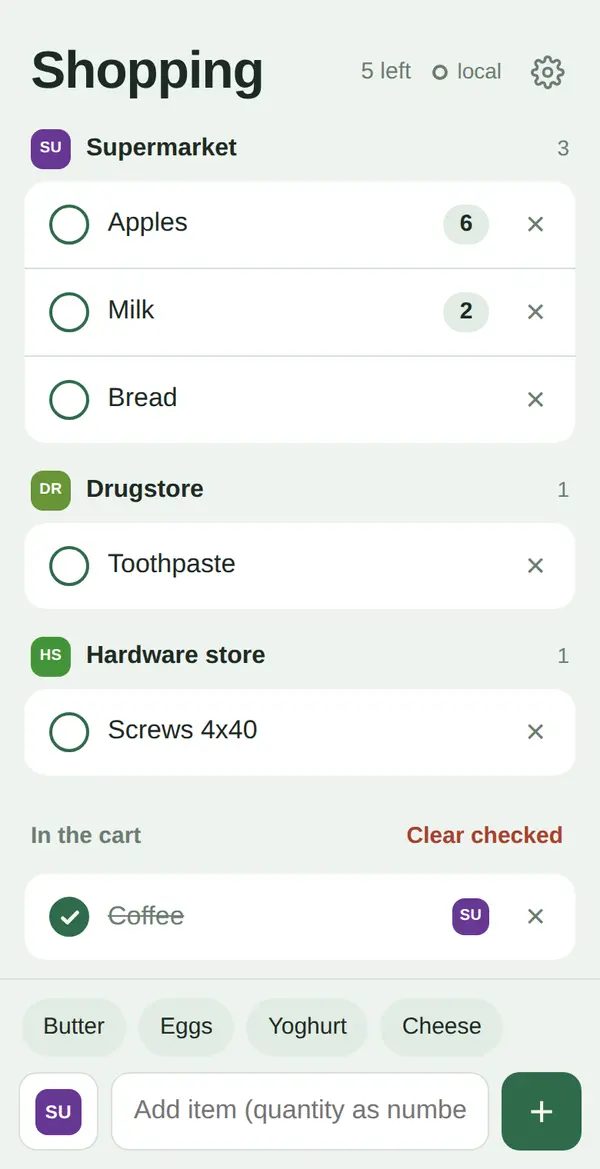
Key properties
- Quantities as a number before or after the item
- Suggestions from your history – long-press removes a suggestion
- Shops with your own icons, list automatically grouped by shop
- Sync between your devices (optional), protected by your own key
- Starts without network, changes are sent later
- The server keeps the last 50 versions – restore with one tap
- Keeps the screen on while shopping (can be switched off)
- Checked items disappear automatically after 12 hours
- Interface in English, German, Dutch, French, Italian and Spanish
- Light and dark mode following your system setting
Privacy: the app loads no external fonts, scripts or trackers. Without sync your list stays on your device, with sync only on your own server.
Installation
You need web space with HTTPS and PHP 7.4 or newer.
- Unzip the archive and generate a key, e.g. with
openssl rand -hex 24. - Put the key into
config.php– keep the single quotes:const TOKEN = 'your-key'; - Upload the
shopping-listfolder to your web space via FTP. - Make sure PHP can write to
data/(usually755,777on some hosts). The folder stays blocked from the web by the included.htaccess. - Open the address on your iPhone in Safari and choose Share → Add to Home Screen.
- Start the app from the icon, tap the gear and enter the same key under Sync key. A green dot means: synced. Repeat on every other device.
Detailed instructions with test commands and update notes are included as
README.md in the ZIP.
Typical use cases
- You want a shopping list without ads, accounts or data collection.
- You plan on your computer and shop with your phone.
- You shop in several stores and only want to see what you need in the current one.
Changelog (short)
| Version | Date | Changes |
|---|---|---|
| 1.6.1 | 22 Sep 2026 | First public release with shops, quantities, sync, backups, offline start and six languages. |
Technical details & compatibility
- Tested with: iPhone (Safari, as home-screen app) and Firefox on Linux
- Browsers: current versions of Safari, Firefox, Chrome and Edge; “Keep screen on” on iPhone requires iOS 18.4
- Server: PHP 7.4+ with Apache (for the
.htaccess), no database required - Storage: a JSON file on your server plus the last 50 versions as backup
- Footprint: one HTML file, one PHP script, one service worker – no dependencies
- License: MIT – free to use and modify
Sync is designed for one person with several devices: the change sent last wins. If you ever edit offline on two devices at the same time, use “Restore earlier version” in the settings.